Before you start
- What goes in
- Two 148 × 210 mm SVG artwork inputs: citrus promotion and a short menu. Table tent / A5 preset; 148 mm width, 80 mm base depth, 210 mm face height. SBS 350 at explicit 0.50 mm; tab-through-slot closure; physical sample stock.
- What comes out
- An editable practice project you build in the app, checked flat and folded; separate technical and presentation exports. Supplied downloads include editable artwork, a worksheet and clearly labelled source-engine geometry.
A practical example
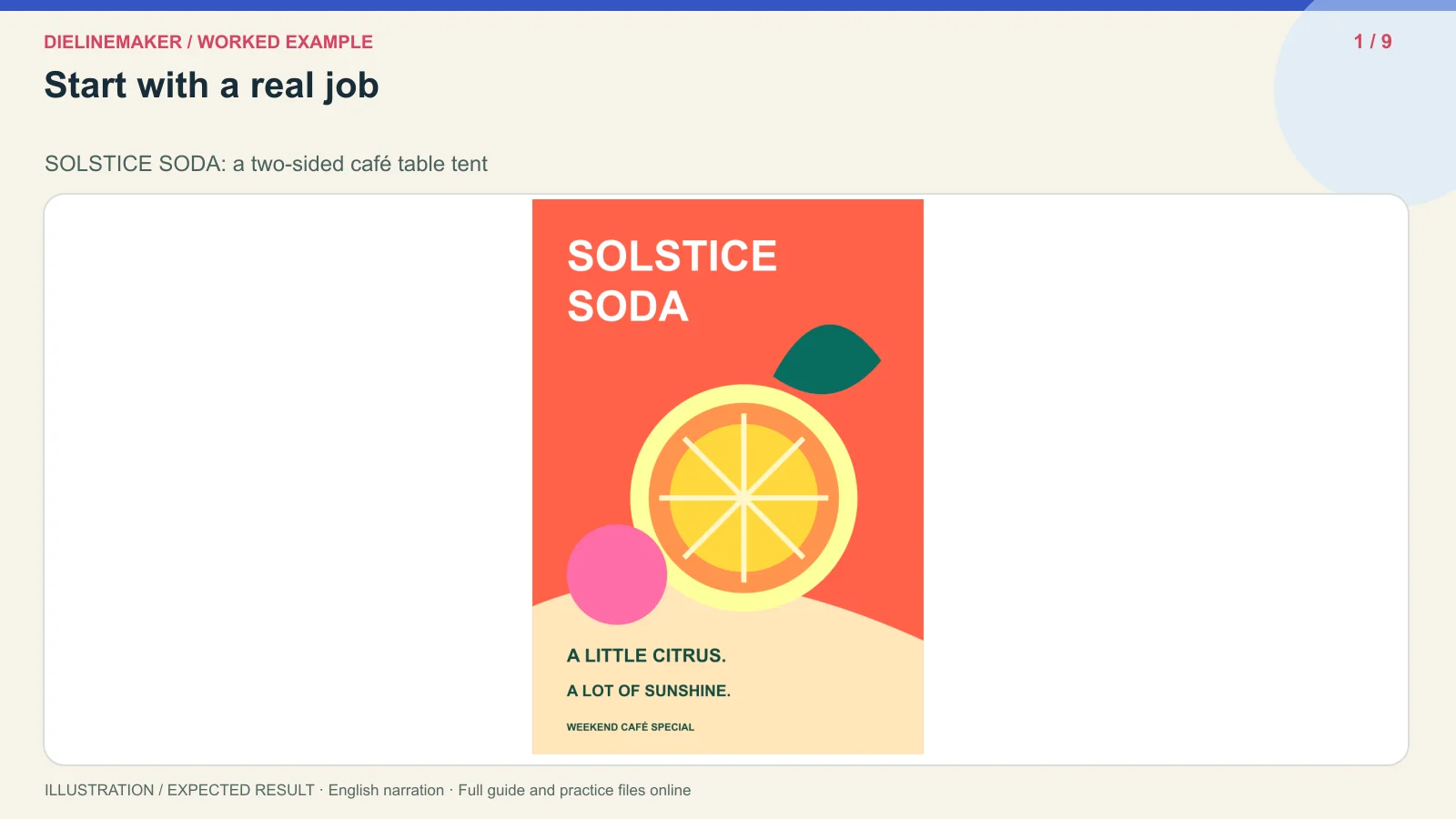
SOLSTICE SODA: a two-sided café table tent
Create a citrus-coloured A5 café promotion with a distinct menu on the reverse-facing panel. Follow the relationship between face height, footprint, locking base and the back panel’s reading direction.
Try the example files
Editable front artwork (SVG)Editable creative artwork for this practice project.Editable back artwork (SVG)Editable creative artwork for this practice project.Source-engine technical output (SVG)Technical SVG generated directly with the application geometry engine; not a browser export or approved production proof.Geometry inputs and verification (JSON)Exact geometry inputs, measured bounds and source-engine verification.Annotated before-and-after diagram (SVG)Explanatory before-and-after concept diagram.Worked-example worksheet (JSON)Practice settings, steps and checks for this guide.Annotated source-engine geometry overviewEditable creative artwork for this practice project.Download this example’s transcriptChaptered English narration for this specific worked example.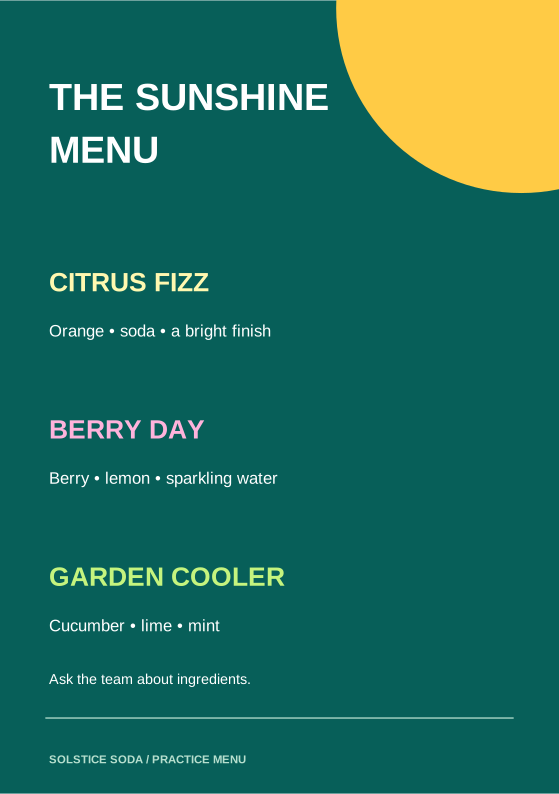
A separate exercise for this guide
SOLSTICE SODA: a two-sided café table tent
Create a citrus-coloured A5 café promotion with a distinct menu on the reverse-facing panel. Follow the relationship between face height, footprint, locking base and the back panel’s reading direction.
Prepare these inputs
- Two 148 × 210 mm SVG artwork inputs: citrus promotion and a short menu.
- Table tent / A5 preset; 148 mm width, 80 mm base depth, 210 mm face height.
- SBS 350 at explicit 0.50 mm; tab-through-slot closure; physical sample stock.
Settings to try and what changes
Width / Base depth / Face height
148 / 80 / 210 mm
Face size and table footprint are separate; ideal standing height is about 206.2 mm.
Base / Lock height / Tab width
Tab through slot / 20 / 59 mm
Builds a specific slot and barbed tab; keep the lower-back fastening region clear.
Apex slot
Off
The simple example contains one tent part, without a separate upright header.
Front / Back artwork
Outside side; separately targeted faces
Back has a 180-degree upright correction in the source model; inspect the folded result before manual rotation.
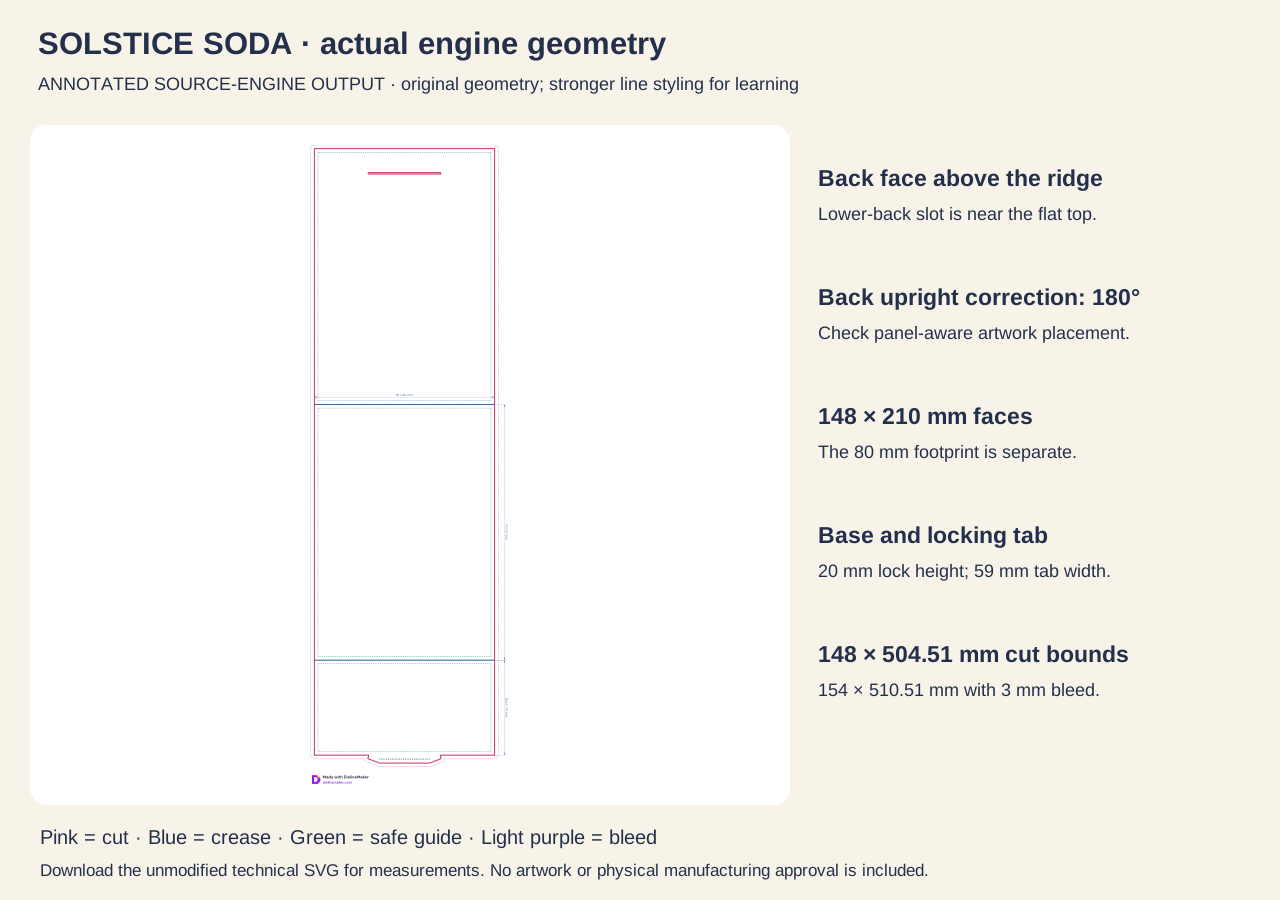
Cut envelope / bleed bounds
148 × 504.51 / 154 × 510.51 mm
Actual source-engine bounds with 3 mm bleed, before dimension annotations.
Follow this specific job
Separate the three measurements
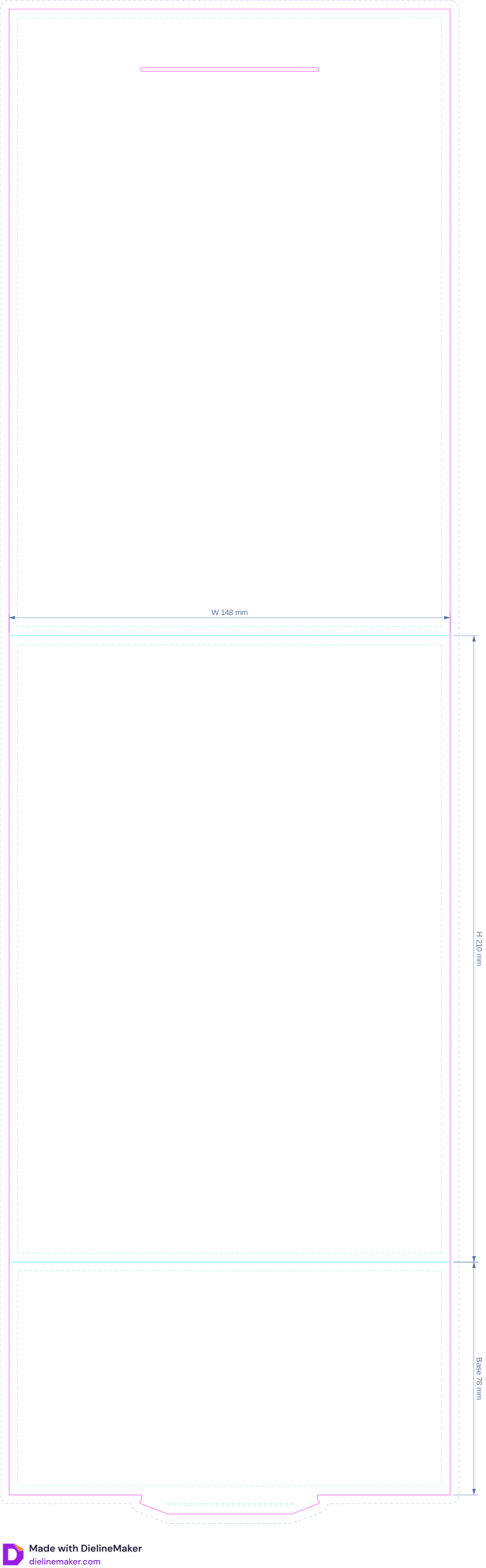
Record 148 mm width, 210 mm face height and 80 mm footprint. Compare the 206.2 mm ideal standing height with the full 504.51 mm flat blank length. The full walkthrough below shows the editor sequence.
Compare face orientation deliberately
Use the front promotion and distinct back menu as separately targeted outside artwork. Read both when folded; remove a redundant rotation if the app already applies the back panel’s 180-degree upright correction.
Inspect the closure and real-size result
Use a 20 mm lock height and 59 mm tab. Check the recorded source-engine output, then print at 100%, cut, score and engage the tab. Confirm the slot avoids menu text and both feet rest evenly.
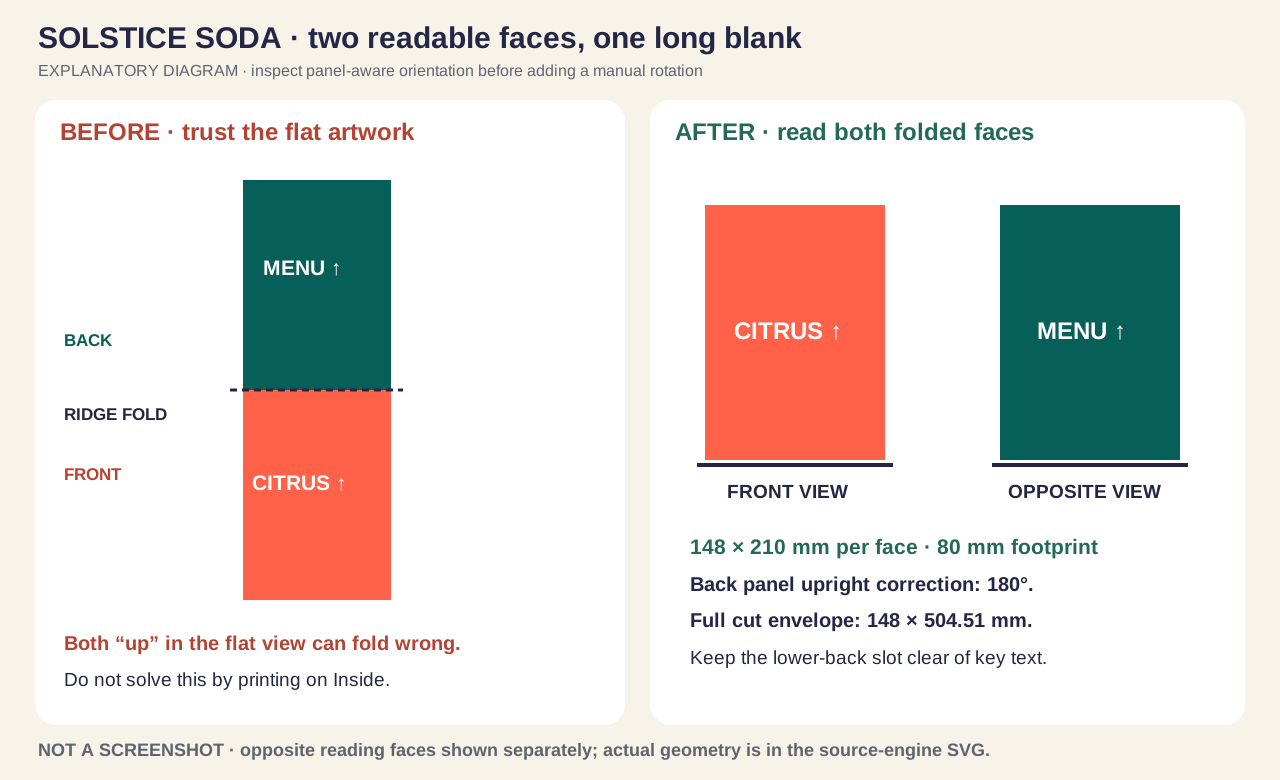
Before: identify the problem
- Two flat graphics can fold into an upside-down back.
- An A5 face mistaken for an A5 or A4 full blank.
After: the result to aim for
- Both outward faces read upright when folded.
- Full-length blank, closure and physical footprint checked.
Open the annotated concept illustration
Inspect your result
- Do not add an extra rotation if panel-aware placement already orients the back.
- Outside/Inside printing is different from Front/Back face targeting.
- Print at 100%; the 504.51 mm blank length exceeds A3.
- Base locks without tearing; both feet sit evenly on the table.
- Source engine returns zero warnings; test real stock, reading distance and stability.
Files for this example
Editable front artwork (SVG)Vector artwork input, 148 × 210 mm; live text and fictional branding. Upload to the front panel; not a dieline.Editable back artwork (SVG)Distinct vector artwork input, 148 × 210 mm. Upload to the back panel and check folded orientation.Source-engine technical output (SVG)Actual source-engine geometry, without artwork; cut/crease/safe/glue guides where applicable, dimension labels and original vector watermark. Not a browser export or approved production file.Geometry inputs and verification (JSON)Recorded dimensions, parameters, material, warnings, bounds and panel orientation from the source engine.Annotated geometry overview (SVG)The source-engine paths displayed with stronger lines and explanatory labels. Use the separate unmodified technical SVG for actual-size measurement.Annotated before-and-after diagram (SVG)Explanatory illustration of measurements, orientation and checks; not an application screenshot.Worked-example worksheet (JSON)Readable settings and assembly checks, not an importable .foldline project.Fictional training project. Editable SVG artwork and annotated comparison are original explanatory illustrations. The technical SVG is a technical reference generated by DielineMaker from the recorded settings, not a browser export, artwork proof or manufacturing approval. Its vector watermark is preserved. Confirm a physical sample and supplier requirements before production.
Step-by-step walkthrough
Choose a two-face message and one specific size
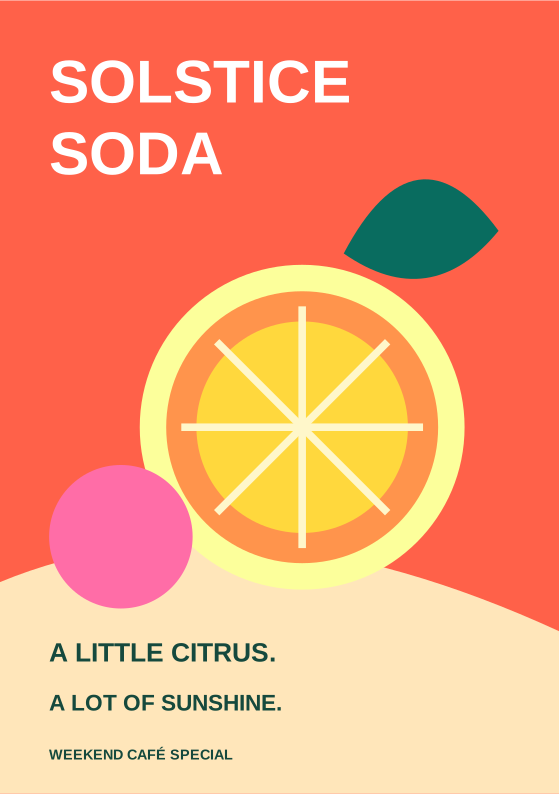
SOLSTICE SODA is a fictional café promotion. The front announces a citrus weekend; the back lists three drinks and a short service note. Use the A5 table tent preset: Width 148 mm, Base depth 80 mm and Face height 210 mm. A5 describes each face; the whole flat blank is much longer.
Set the closure before laying out the back
Select Tab through slot, Lock height 20 mm and Tab width 59 mm explicitly. Leave Apex slot with upright graphic off. Choose SBS 350 at 0.50 mm caliper, 3 mm bleed and 3 mm safe guides. Inspect the lower back slot so the menu artwork will not cross it.
Upload two distinct face inputs
Upload solstice-soda-front.svg and solstice-soda-back.svg. Assign them to Front face and Back face respectively and begin with Contain. Both inputs are editable 148 × 210 mm SVG artwork. The colourful food illustrations are vectors, not photographs of a real café menu or an app screenshot.
Check the folded reading direction on both faces
Use split view and fold the model. The front and back must both read upright when you walk around the standing tent. The source model marks the back panel with a 180-degree upright correction; panel-aware placement may apply it already. Correct the target or rotation only after reading the folded result. Do not flip the whole sheet or switch to inside printing to hide the error.
Inspect the technical blank at actual size
The recorded source-engine cut envelope is 148 × 504.51 mm; 3 mm bleed expands its bounds to 154 × 510.51 mm, before dimension annotations. A4 and A3 cannot contain that full length at 100%. Plan a larger production sheet or tile a paper dummy. Check that the printer has not enabled Fit to page.
Fold and lock a real sample
Score the ridge and front-to-base crease, cut the outline and back slot, and form the A-frame. Pass the base tab through the back slot until the barbs catch. Do not tape over an ill-fitting tab and count that as approval. The two feet should sit evenly; the menu must remain readable and the slot must not tear.
Test the use case before the full run
Read the tent from both sides at its intended distance, on the actual table or counter. Check that the 80 mm footprint fits and that the assembled stock stands adequately when handled. If a QR code is added, use a real destination, preserve its quiet zone and scan a printed sample; the supplied exercise intentionally contains no fake scannable code.
Save, export and make a final paired proof
Save the editable project. Export the dieline or print file requested by the supplier and a separate folded presentation image. Confirm the page size, artwork orientation, trim/bleed, slot, folds and technical line names. If the supplier prints only the outside blank, a two-face tent can be a one-sided print job; request duplex only when the design truly includes reverse-side printing.
Options at a glance
| Control or choice | What it changes | How to use it well |
|---|---|---|
| Width | Sets the width of each face, 50–400 mm. Both front and back use this width. | Use 148 mm, matching the width of each supplied A5 face input. |
| Face height | Sets the panel distance from the table edge to the ridge, 50–400 mm. It is measured along the leaning face. | Use 210 mm. Do not reduce the art to 206.2 mm; the printable face remains 148 × 210 mm. |
| Base depth | Sets the requested front-to-back footprint, 20–250 mm in the control. The builder limits it to 20–120% of Face height and warns if adjusted. | Use 80 mm with a 210 mm face. The allowed geometric range at this face height is 42–252 mm, further constrained by the input limit. A requested 20 mm footprint resolves to 42 mm with a warning; read that warning instead of assuming 20 mm was built. |
| Base | Chooses how the bottom reaches and attaches to the back face. | Use Tab through slot for SOLSTICE SODA. |
| Lock height | Sets how far up the back face, measured from its table edge, the base meets it. Auto uses 10% of Face height limited to 8–20 mm; the input range is 4–120 mm and the builder caps it at 40% of Face height. | Enter 20 mm explicitly. At 210 mm face height the builder’s upper cap is 84 mm, so an entered 120 mm cannot remain 120 mm in this construction. |
| Tab width | Sets the locking tab width. Auto is 40% of the face width; the control accepts 10–200 mm and the builder also limits it to Width minus 16 mm. | Enter 59 mm for the 148 mm-wide exercise. Auto would be 59.2 mm. At this face width the builder cap is 132 mm; the control’s general 200 mm maximum does not override that. |
| Apex slot with upright graphic | Adds a long slit across the ridge fold and a separate upright graphic card that slides through it and stands on the base. | Leave off for the simple two-sided café tent. If enabled later, inspect both parts in the output; do not print only the tent and assume the extra card is included in it. |
Detailed control reference
Find the control, understand its effect, and choose it for the job you are making. Available controls depend on the selected structure, object, workspace and output.
Print setup → Size
Width
Sets the width of each face, 50–400 mm. Both front and back use this width.
- When it helps most
- Choose for message length, viewing distance and available counter space.
- Impact and trade-offs
- More width permits larger artwork but increases blank area and the base span. It does not change the face height or the automatic stability limits.
- Worked example
- Use 148 mm, matching the width of each supplied A5 face input.
Print setup → Size
Face height
Sets the panel distance from the table edge to the ridge, 50–400 mm. It is measured along the leaning face.
- When it helps most
- Use it to establish the artwork proportion and approximate reading area.
- Impact and trade-offs
- It is not the vertical standing height. For an 80 mm footprint and 210 mm face, the ideal ridge height is √(210² − 40²), approximately 206.2 mm. Board thickness and the physical assembly affect the result.
- Worked example
- Use 210 mm. Do not reduce the art to 206.2 mm; the printable face remains 148 × 210 mm.
Print setup → Size
Base depth
Sets the requested front-to-back footprint, 20–250 mm in the control. The builder limits it to 20–120% of Face height and warns if adjusted.
- When it helps most
- A wider footprint generally gives a less narrow stance; a shallower one uses less table depth.
- Impact and trade-offs
- Changing the footprint changes the lean, ridge height and generated base length. It does not certify resistance to wind or knocks. The actual base panel is not necessarily the same length as the footprint because it meets the back above the table.
- Worked example
- Use 80 mm with a 210 mm face. The allowed geometric range at this face height is 42–252 mm, further constrained by the input limit. A requested 20 mm footprint resolves to 42 mm with a warning; read that warning instead of assuming 20 mm was built.
Print setup → Size → Closure (Table tent)
Base
Chooses how the bottom reaches and attaches to the back face.
- Tab through slot
- A barbed tab passes through a slot in the back face and catches outside. Inspect both the slot and tab after changing dimensions.
- Glued
- An automatically sized glue flap turns up the inside back face. Tab width no longer applies; there is no separate exposed glue-flap-width control in this template.
- When it helps most
- Tab through slot suits a glue-free trial or a tent assembled at the venue. Glued suits a workflow where the converter bonds the base flap.
- Impact and trade-offs
- This changes actual cut/fold geometry, not merely the 3D appearance. The tab projects through a back slot; the glue flap turns onto the inside back. Keep artwork clear of the fastening region.
- Worked example
- Use Tab through slot for SOLSTICE SODA.
Print setup → Size → Closure (Table tent)
Lock height
Sets how far up the back face, measured from its table edge, the base meets it. Auto uses 10% of Face height limited to 8–20 mm; the input range is 4–120 mm and the builder caps it at 40% of Face height.
- When it helps most
- Helps place the closure and manage the generated base geometry, especially when the back carries a low-positioned message.
- Impact and trade-offs
- Moving the meeting point changes the sloping base, back slot or glue-flap position. It does not directly change the footprint. Do not place a QR code or critical price across this region.
- Worked example
- Enter 20 mm explicitly. At 210 mm face height the builder’s upper cap is 84 mm, so an entered 120 mm cannot remain 120 mm in this construction.
Print setup → Size → Closure (Table tent); visible for Tab through slot
Tab width
Sets the locking tab width. Auto is 40% of the face width; the control accepts 10–200 mm and the builder also limits it to Width minus 16 mm.
- When it helps most
- Adjust only when the sample shows a real assembly or retention problem and the slot still leaves adequate side material.
- Impact and trade-offs
- A wider tab also changes the matching slot. It can affect insertion effort, tearing risk and the amount of interrupted artwork; material and cutting tolerances still matter.
- Worked example
- Enter 59 mm for the 148 mm-wide exercise. Auto would be 59.2 mm. At this face width the builder cap is 132 mm; the control’s general 200 mm maximum does not override that.
Print setup → Size → Features (Table tent)
Apex slot with upright graphic
Adds a long slit across the ridge fold and a separate upright graphic card that slides through it and stands on the base.
- When it helps most
- Useful for an extra menu header or event sign extending above the A-frame.
- Impact and trade-offs
- Adds a separate part and weakens the uninterrupted ridge area. It is not a window cut through the front panel. Check the card’s fit, balance, print sides and assembly order in a real sample.
- Worked example
- Leave off for the simple two-sided café tent. If enabled later, inspect both parts in the output; do not print only the tent and assume the extra card is included in it.
Print setup → Size → Features (Table tent); visible when Apex slot is enabled
Graphic above the ridge
Sets how far the upright graphic rises above the ridge: 20–400 mm, with Auto at about 60% of Face height.
- When it helps most
- Use it to control the visual prominence of a separate header or offer card.
- Impact and trade-offs
- This is only the rise above the ridge, not the total graphic-card height. The card extends down to the base. A tall card increases the top-heavy area and needs a physical stability check.
- Worked example
- With a 210 mm face, Auto is approximately 126 mm of rise. The base exercise has no upright graphic, so this value has no effect there.
Print setup → Material; Size → Production → Caliper
Board and caliper
Choose a compatible board and set its real thickness. Available stock families include SBS 350, FBB 400, SBS 300, Kraft 350, Black 350 and GD2 350.
- When it helps most
- Caliper affects fold/slot geometry and the ability of the face to remain flat. Stock finish affects appearance and practical use on a counter.
- Impact and trade-offs
- GSM does not determine caliper by itself. The model switches to a double-crease treatment at 0.8 mm or above, but that does not mean every thick board is suitable for this tent or your cutter. A material preview does not certify moisture resistance.
- Worked example
- Use SBS 350 at explicit 0.50 mm. Ask the printer about cracking, scoring and finish; test an assembled sample under the intended indoor conditions.
Design → artwork layer targeting; inspect 2D and 3D
Front, Back, Outside and rotation
The front and back are separate faces of one A-frame. Both outward-reading graphics normally belong to the outside printed side of the blank. The back panel in this model has an upright correction of 180 degrees.
- When it helps most
- Use separate front and back artwork to show a hero message on one face and a menu on the other.
- Impact and trade-offs
- “Two-sided table tent” means two visible faces; it does not automatically mean duplex printing on both sides of the board. A panel-targeted layer may already receive upright orientation, so adding another 180 degrees can undo the correct result.
- Worked example
- Attach the first SVG to Front face and the second to Back face. Fold and read both. A manually prepared full-blank artwork must account for the relative face orientation, but always verify the actual export before setting printer duplex options.
Design → selected image; Print setup → Size → Production
Fit, bleed and safe content
Contain keeps the full input visible; Cover fills the target and can crop; manual scale/position lets you refine placement. Bleed extends edge colour beyond cut edges and safe guides mark a practical inset.
- When it helps most
- Useful when an uploaded graphic has a different aspect ratio or important text near the trim.
- Impact and trade-offs
- The supplied 148 × 210 mm SVGs match the nominal face ratio but do not automatically reserve the slot or supply every bleed area. Safe guides do not understand the reading importance of your content.
- Worked example
- Use Contain initially, inspect the result at final size, then extend the background as required. Use 3 mm bleed and keep important content at least 3 mm inside cuts for this exercise; allow additional clear space near the ridge and back closure.
2D / 3D / split; Mockup; Download
Fold state, scene and export
Fold state lets you compare the flat blank with the standing structure. A scene changes presentation; Download selects the file type and production settings.
- When it helps most
- Use split view to connect a wrong-facing line of text with its flat panel. Export a preview for discussion and technical files for production.
- Impact and trade-offs
- Moving the camera does not fix artwork rotation or an undersized base. A presentation PNG does not carry cutter paths. Available downloads and watermarks depend on the account and chosen plan.
- Worked example
- Save SOLSTICE SODA tent v01. Inspect the technical file at 100%, then view a folded render from each side. Confirm the output contains the selected tab-and-slot version.
Face size, footprint, height and blank size are different
The practice uses a 148 × 210 mm front and a matching back. The front-to-back footprint is 80 mm. Face height measures along the sloping face, while the ideal vertical height is about 206.2 mm. None of those measurements describes the entire blank.
The base reaches the back at the selected lock height above the table. Its generated length is calculated from the geometry and material, so entering an 80 mm Base depth does not create an 80 mm rectangle called Base. The complete tab-and-slot example has a 148 × 504.51 mm cut envelope. These recorded dimensions come from the source engine, not an assumed sum of two A5 sheets plus a fixed tab.
Changing Lock height, Base, caliper or footprint can change the final blank. Use the newly generated file after each structural change; do not reuse the old die under new artwork.
Two visible sides usually share one printed side of the board
Think of one long blank folded over its ridge. Its outside becomes two outward-facing surfaces. In this model Front face lies on one side of the ridge in the flat view and Back face on the other. Text that looks upright everywhere on the flat sheet can therefore become upside down when folded.
Panel-targeted artwork uses the model’s upright information. The example source records a 180-degree correction for Back face. Inspect the actual outcome before rotating manually: applying a second 180 degrees can introduce the very error you are trying to avoid. If you prepare a complete flat spread externally, use the exported panel geometry and make a folded print proof.
Outside/Inside chooses the printed side of the substrate. Front/Back names the tent faces. Those are different decisions. A request for a “two-sided table tent” should be clarified with the printer as two reading faces, and separately as single-sided or duplex printing on the board.
A readable café layout without trim or closure collisions
The front artwork puts the citrus illustration and short headline high on the face. The back contains short menu lines well above the locking region. Keep the ridge clear enough that the fold does not run through fine text. Avoid prices, terms or a QR code across the lower-back slot, even if the flat artwork preview looks continuous.
The SVG inputs are editable in a vector editor. Within DielineMaker the upload is one artwork layer, not an automatic conversion of every internal text object into native text controls. Add app-native text separately when you need to change menu wording without replacing the source SVG. Confirm embedded or substituted fonts in the final production format.
Bleed solves small cut-position variation at exterior edges; it does not move a headline away from a crease or repair a cropped ingredient line. Compare Contain and Cover deliberately, then judge the intended final-size trim and fold. Keep the closure region clear even if the generic safe-area guide does not warn about your specific wording.
Tab-through-slot and glued bases: which job needs which?
The tab version is useful for a sample that can be assembled without a glue operation. It still depends on accurate cutting, suitable board and intact barbs. A slot that looks correct in 3D can tear in a poor physical sample. Verify insertion and retention rather than assuming the model simulates paper strength.
The glued version uses an internally sized glue flap and has no tab-width control. It changes the dieline and the adhesive-contact requirements. Ask the converter which areas must be kept free of ink or coating. Allow the agreed curing process before judging whether the tent stands correctly.
Switching to a ridge-slot graphic produces a separate card as well as the base tent. Print, cut and test both parts, including how the card slides through the slit and stands on the base. A larger rise increases display height but also requires a more careful stability test.
Before and after: a flat design becomes a checked standing sign
Before: two face graphics with no target assignment, a lower-back message over the closure, and a print dialogue shrinking a long blank onto A4. After: two identified outward-facing panels, correctly read in the folded view, clear space at the slot, an explicit 80 mm footprint and a measured full-size print sample.
The accompanying comparison is an explanatory diagram. The technical SVG was generated directly with DielineMaker’s source engine at the listed dimensions, has the original vector watermark and built without warnings. It does not include the café artwork. The guide teaches how to combine your artwork and structure in the app; the download is not a certified production proof or a photographed finished tent.
Adapt the same controls to table numbers, menus and QR signs
For a wedding table number, use a short, high-contrast number that reads from both directions; keep the base and fold checks. For a long drinks menu, increase face width or simplify the copy before shrinking every line. For a tiny QR sign, preserve scan size and quiet zone and test at the intended distance rather than choosing the smallest possible tent.
Outdoor placement, damp tables and repeated cleaning introduce material and stability requirements beyond a rigid-panel preview. Agree suitable stock and finishing with the printer and test in the real conditions. A taller face or upright header should trigger a new physical sample, even when the engine generates it without warnings.
Check your work
- Do not add an extra rotation if panel-aware placement already orients the back.
- Outside/Inside printing is different from Front/Back face targeting.
- Print at 100%; the 504.51 mm blank length exceeds A3.
- Base locks without tearing; both feet sit evenly on the table.
- Source engine returns zero warnings; test real stock, reading distance and stability.
- Open the actual exported file and verify scale, technical line separation and artwork orientation.
- Keep the saved editable project, supplier-approved production file and client presentation image distinct.
Troubleshooting
The back message is upside down
Verify Back face targeting and outside side, then inspect folded reading direction. The model supplies a 180-degree upright correction; remove a redundant manual rotation rather than flipping the whole artwork spread.
A requested base depth changes itself
The builder restricts footprint to 20–120% of face height and reports an adjustment. For 210 mm faces a requested 20 mm base becomes 42 mm. Use a sensible explicit value and check the generated geometry.
The slot cuts through the menu or QR code
Move essential artwork away from the back closure region or reconsider Lock height with a new sample. Bleed and generic safe guides do not repair content placed across a structural hole.
The tab is hard to insert or tears
Check actual scale, caliper, cutter accuracy and slot cleanliness. Compare a modest tab-width adjustment with a fresh sample, or choose the glued construction with the converter; do not enlarge the slot arbitrarily in the final die without checking retention.
The tent looks correct in 3D but rocks on the table
Inspect the physical score, tab engagement and stock warp. Confirm both feet rest evenly and that the base was folded as intended. The preview is a rigid geometry model, not a simulation of creasing force or board stiffness.
A5 artwork prints as a tiny tent on A4
Each face is A5, but the complete cut envelope is 148 × 504.51 mm. Disable Fit to page and choose a suitable sheet or full-scale tiled dummy.
An enabled upright graphic is missing from the print job
The Apex slot feature creates a separate graphic-card part. Include and inspect that part, its actual full height and its print sides, then test its fit through the ridge slit.